
An honest review of the best WordPress Hosting Companies for Australia by Captain FI. There are different options depending on your technical skills and budget, with my pick for each category.
Captain FI is not a financial advisor, does not hold an AFSL and this article is not financial advice. This website is reader-supported, which means we may be paid when you visit links to partner or featured sites, or by advertising on the site. For more information please read my Privacy Policy, Terms of Use, and Financial Disclaimer
Executive Summary
When people think about building a website, they often focus on design, content, or cost. However, before you can even start creating your website, you’ll need a place to host it online.
Website hosting is the service that makes your website accessible on the internet. It works by storing all your site’s data on a server, which is essentially a computer that is online 24/7. This server delivers your site’s content to a user’s browser when they type in your web address.
A useful way to think about hosting is to compare it to managing a share portfolio. You can track everything yourself, record every trade manually, and manage risk yourself. Or you can use tools to simplify the process, or even outsource it entirely to someone who manages it for you. Each option involves a different balance of time, cost, and involvement.
This is where most “best hosting” lists fall short. They don’t compare different WordPress hosting categories and try to lump all the options together. In this guide, I take a different approach. I focus on reliability, support, scalability, and risk to help you choose an option that protects your website and supports business growth.
Comparing WordPress Hosting for Australian Websites
After trying and researching heaps of different WordPress hosting options, I’ve put together a list of recommendations below.
I realize that not everyone wants to spend hours setting up a server from scratch to save a few bucks. While there are some really good cheap options, I’ve also included options from more expensive categories if you just want to focus on your content and never have to worry about servers/updates/maintenance yourself.
| Provider | Price | Service (What you Get) |
| DigitalOcean | Low | Unmanaged hosting. You set up and manage everything, including the server, WordPress, security, and backups. Full control, high technical involvement. |
| Bluehost | Low to Medium | Managed hosting. The server is maintained for you, but you still manage WordPress, updates, and troubleshooting. Basic support is included. |
| Kinsta | Medium to High | Managed WordPress hosting. Performance, security, backups, and infrastructure handled. You manage functionality, software updates and maintenance. |
| Paramark | High | Managed WordPress hosting + maintenance. Hosting, updates, security, backups, and website support are handled. 100% done for you. |
What hosting do you need?
The right hosting depends on how involved you want to be and how important your website is to your income.
Using the investing analogy, this is similar to tracking your share portfolio. You can track every trade manually, use tools like Sharesight to streamline the process, or outsource it entirely. Each approach has its trade-offs.
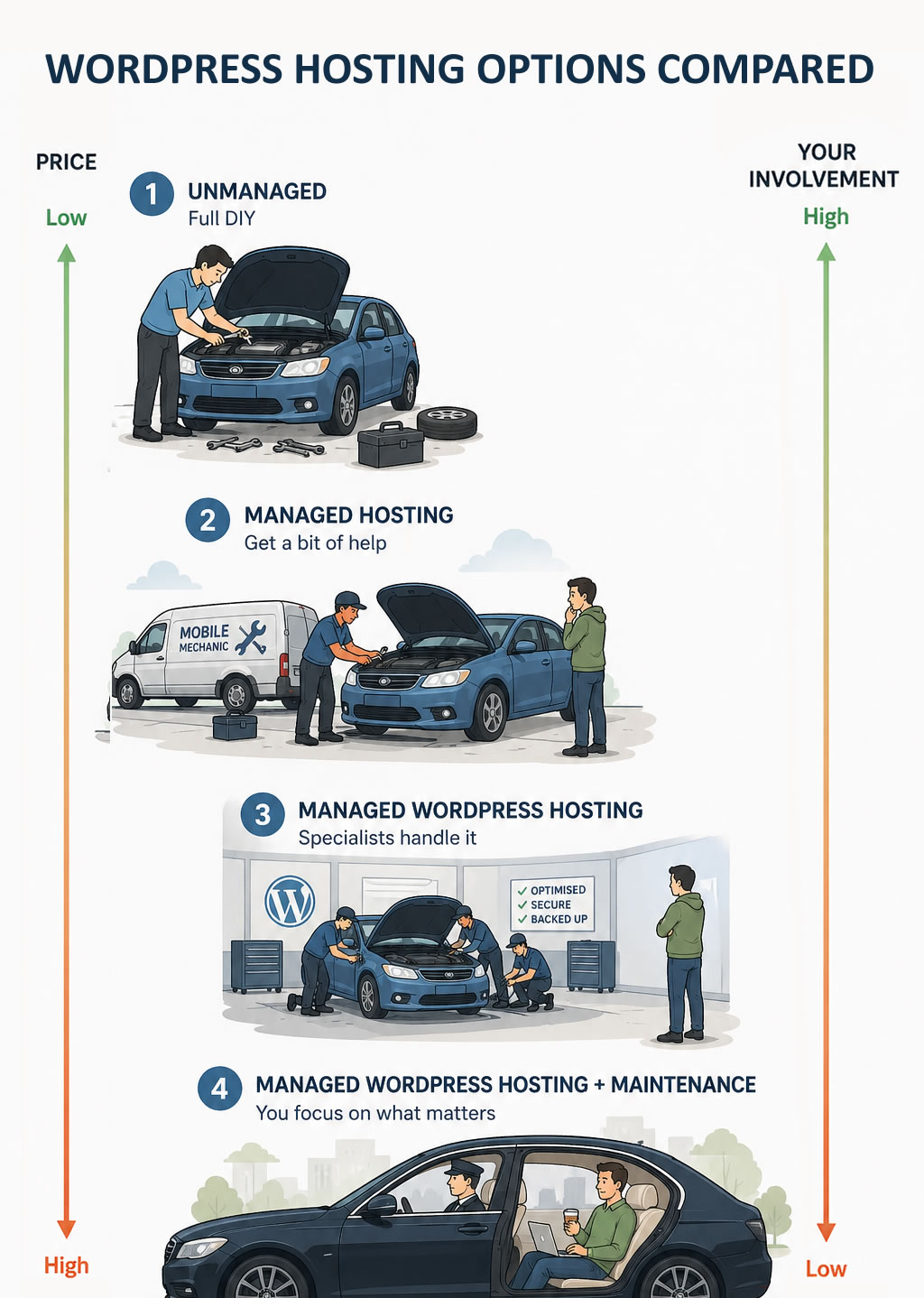
At one end, you manage everything yourself. At the other end, your hosting company does just about everything for you. As you move along this spectrum, cost increases, but so does simplicity and reliability.
If your website generates income, it is worth considering how much time you want to spend managing issues versus focusing on results.
Unmanaged Hosting – You do everything and get the best price
Unmanaged hosting is like managing your own share portfolio manually in an Excel spreadsheet.
With unmanaged hosting, you are given a blank server. You need to set up the operating system, install WordPress, configure databases, manage security, and create your own backup system. Nothing is pre-configured, and there is no built-in support if something goes wrong. It is harder than it sounds, and the hosting company won’t help you fix anything that goes wrong.
The advantage is cost and flexibility. It is one of the most affordable ways to run a website, and it lets you build your environment exactly the way you want.
However, if your website goes down, your database fails, or your server is compromised, you are responsible for diagnosing and fixing the issue. There is no safety net.
Unless you have the skills or a developer managing the setup, the issues can quickly outweigh the cost savings.
This option isn’t for most people
Choose DigitalOcean: If you are comfortable managing your own server or have a developer supporting you, DigitalOcean offers affordable cloud hosting with data center options in Sydney, making it a good option for unmanaged WordPress servers in Australia.
Managed Hosting – A bit of help, at a low cost
Managed hosting is like using a platform such as Sharesight. It reduces the manual work, but you are still responsible for managing everything.
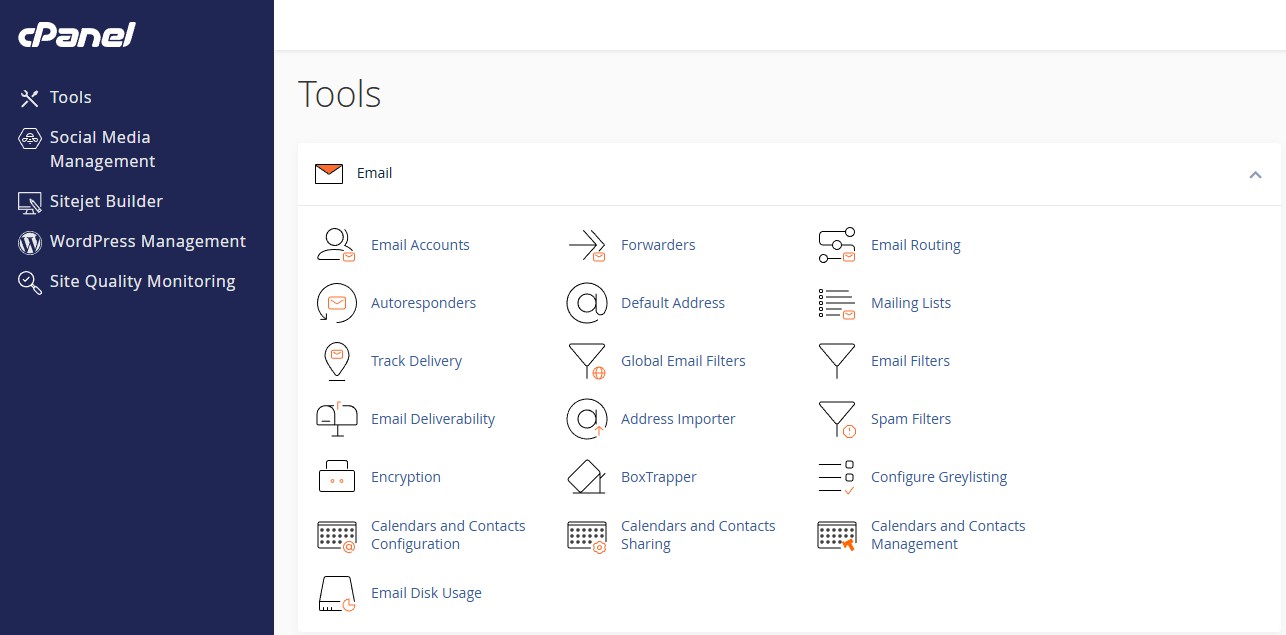
With managed hosting, you get server management software such as cPanel or Plesk, and the hosting company usually handles the server itself. You still install WordPress, manage your website, and handle updates, backups, and plugins.
The benefit is improved support compared to unmanaged hosting, without a large increase in cost.

However, you are still responsible for your website. If something breaks, you will need to fix it or outsource it. Support is usually limited to hosting issues, not your website itself.
cPanel and Plesk also have their own issues to deal with. They’re not as user-friendly as managed WordPress dashboards, and they can have security issues you wouldn’t get on managed WordPress hosting. In 2026, a serious cPanel exploit led to widespread security breaches worldwide.
This is still a great place to start for most people.
Choose Bluehost: If you want a reliable Australian provider with local support and solid performance, Bluehost offers managed hosting that balances cost with control.
Managed WordPress hosting – less headaches, slightly higher cost
Managed WordPress hosting is the more reliable sibling of generic managed hosting and often comes with better support.
Managed WordPress hosting is custom-designed for WordPress. You get WordPress preinstalled on the server, so you don’t have to deal with cPanel.
Because the server is designed for WordPress, you also get fewer issues that plague WordPress websites on cPanel hosting. This means fewer database failures, 500 internal server errors and so on. They can still happen, but usually only if you’re trying to cram too much data onto the website, using too many plugins or have millions of pages.
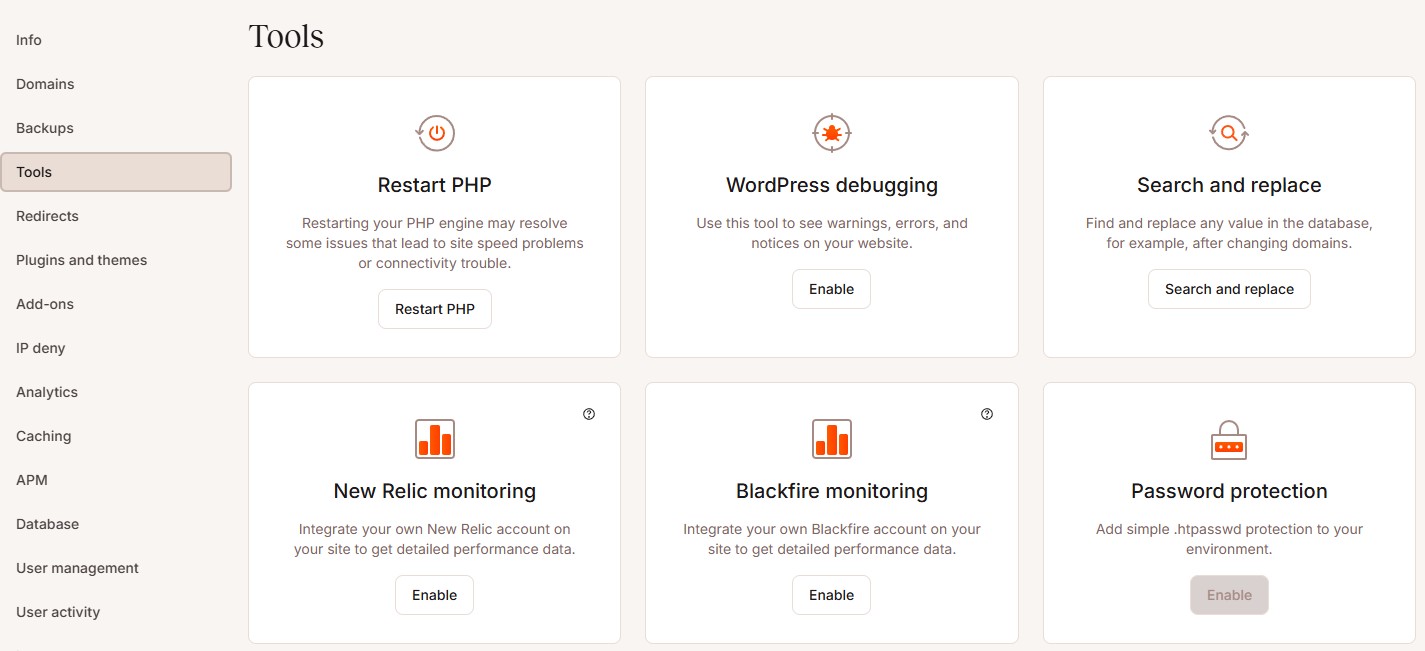
You also get a server interface that doesn’t feel like you’re one click away from nuking your website. It’s easy to see where to add your domain, set up redirects, and SSL; everything is usually pretty intuitive and easy to do without spending hours on YouTube.
You still need to manage your website, though. If something goes wrong with your website, you need to talk to support and get their assistance to fix the problem. Most managed WordPress hosts are good about supporting your website, but if the problem is very complicated or requires custom development, they’re not going to be able to help, and you’ll have to hire a developer.
The main difference is that you are no longer responsible for the WordPress Installation, just how you use WordPress.
For business owners and people building websites as a side hustle, this option provides a balance between control and reduced workload. It allows you to focus on improving your website rather than maintaining the environment it runs on.
This is a great option to move to once your website starts making real money.
Choose Kinsta: If you want a reliable, high-performance WordPress hosting platform with strong support, Kinsta is a great option, built on Google Cloud infrastructure and known for its consistent uptime and responsive support.
Managed WordPress hosting + Maintenance – 100% done-for-you, higher cost
This is like using an accountant or portfolio manager to handle everything for you. They manage the tracking, reporting, and ongoing administration. If something needs attention, it is handled without you needing to step in.
With this approach, both the hosting and the website are managed together. This includes performance, security, updates, backups, and ongoing maintenance of your WordPress site. It also means there is one point of contact for both hosting and website issues.
Managed WordPress hosting with Maintenance is the most hands-off option. It is suited to those who want their website to perform without needing to manage the technical side at all.
I can highly recommend Paramark for WordPress Hosting and maintenance. Paramark is run by Richard Perrin, a friend of mine who will personally work with you to sort out your website migration and hosting. They’ve been operating since 2019, and there are no offshore call centers, support tickets or AI chatbots; you just call him and he sorts out any issues with your website. However, they’re so proactive you’ll rarely need to call for help anyway.
If your website is for your business or your main source of income, these are the guys to use for WordPress hosting.
Choose Paramark: If you want a fully managed solution that handles both hosting and website maintenance, Paramark provides WordPress hosting and maintenance for Australian businesses.
What Makes a Quality Hosting Provider
In my opinion, support, security and reliability are the most important considerations when choosing hosting. Your website should be accessible at all times, and even short periods of downtime can result in lost traffic, leads, and sales. A quality hosting provider keeps your site stable and available, even during periods of higher traffic.
Support is another major factor. When something goes wrong, the speed and quality of support can determine how quickly your site is back online. Good support makes fixing problems easier; slow or absent support will guarantee you stress and anxiety if something goes wrong.
Security also play a critical role. A reputable hosting provider will include measures to protect your server from attacks and provide malware scanning to detect any issues. This helps reduce risk and ensures your website can recover quickly from unexpected issues.

Choosing the Right Server Location
Server location affects how quickly your website loads for your audience. This is why it is important to choose a hosting provider that offers flexibility in where your site is hosted.

For many affiliate and content-driven websites, the audience is often global or heavily US-based. In these cases, hosting in the United States can make sense. For Australian businesses targeting local customers, Australian or Singapore-based servers will provide a better experience.
The main goal is to host your website closer to your audience. A good hosting provider should offer multiple server locations so your setup aligns with where your traffic and customers are located.
Server location is only one part of performance, but choosing the right region can help improve load times and overall user experience.
Local Support Matters
Local support can make a real difference when something goes wrong. Being in the same time zone can mean faster response times and clearer communication.
However, local does not always mean the service is right for you. It is important to understand exactly what is included and how the support relationship works. Some providers offer high levels of support, doing everything on your behalf. Others provide infrastructure only, with limited assistance beyond the hosting environment itself
Before choosing a hosting provider, make sure you understand exactly what your level of involvement will be. Clarify what is covered and what happens if a problem arises. Always maintain visibility of your digital assets, including who controls the domain, hosting, and backups.
Cost vs Value: Choosing the Right Hosting Provider
It is important to compare like-for-like in WordPress hosting. A lower-cost provider and a higher-quality provider within the same category can appear very similar on paper, but the differences usually become obvious when something goes wrong or your website starts to grow.
Rather than comparing feature lists alone, ask practical questions that help you understand the level of service and responsibility involved:
- What level of support is actually included?
- How are backups and security handled?
- How much responsibility still sits with me?
- What happens if my website traffic grows?
- What happens when something breaks?
For example, if a blog post or social media post suddenly drives a large increase in website traffic, can the hosting environment handle the spike without slowing down or going offline? Some lower-cost providers may struggle under heavier traffic loads, while higher-quality providers are better equipped to scale resources and maintain performance.
Support response times can also become important very quickly. If your hosting provider is based in a different time zone and your website goes down outside normal business hours, how long will it take to receive help? A lower-cost provider may rely on slower, ticket-based support, while a higher-quality provider may offer faster response times or live support for urgent issues.
A reliable hosting foundation helps ensure your website can support your business as it grows. Over time, the quality of your hosting can directly influence user experience and the overall effectiveness of your website.
What to Consider Before You Choose
What is your short-term and long-term plan? Every hosting decision comes down to how you balance time and money. Some options require more technical involvement, while others reduce the workload but increase the monthly cost.
Start with your technical skill level. If you have the ability to manage WordPress, troubleshoot issues, and maintain your site, you can take on more responsibility and reduce costs. If not, it is important to recognize that early and factor in the need to outsource. Being clear on your strengths allows you to focus on opportunities rather than getting caught up in technical work.
Your business model should also guide your decision. A lead generation website, an affiliate site, and an eCommerce store all operate differently. eCommerce sites rely on stability during transactions, while content-driven sites need to handle traffic growth. Aligning your hosting with how your site generates value will support better results.
Traffic expectations are another consideration. If you expect steady or increasing traffic, your hosting should be able to handle that growth without slowing down or requiring constant changes.
Finally, choose a hosting setup that matches both your website’s current stage and your ability to manage it. Someone starting a new blog or side hustle may not need a fully managed service straight away, whereas a website generating revenue may benefit from stronger support and reduced technical involvement.
What CaptainFI Looks for in a Hosting Provider
I choose managed hosting because I want my websites to operate as assets.
When I look at a website, I am not focused on getting the cheapest possible price. My preference is reliable, secure hosting that suits my technical abilities for a good price. If a website is going to generate income, it needs to stay online, load quickly, and perform without me needing to step in.
I also think about protection. A website holds content, traffic, and information. Backups and security are part of protecting that asset. If something goes wrong, I want to know the site can be restored quickly without losing data.
My goal is to reduce operational complexity. The less time I spend fixing issues or managing hosting, the more focus I can spend on content, traffic, conversions, and future opportunities. That is where the real returns come from.

Captain FI is a Retired Pilot who lives in Adelaide, South Australia. He is passionate about Financial Independence and writes about Personal Finance and his journey to reach FI at 29, allowing him to retire at 30.